What is an AI agent? A plain-English guide
What is an AI agent? A plain-English guide to how agents plan, use tools and check their work, with real examples, honest limits and safe first steps.
Also in: Español · Français · Deutsch · Português
It's Monday, and fourteen invoices are overdue. A chatbot will happily explain how to write a polite payment reminder. An AI agent opens your accounting system, works out who really owes what, notices that one client paid on Friday and was never marked as paid, drafts thirteen reminders in your usual tone, and asks you before it sends a single one. The gap between telling you how and doing it with you is the short answer to the question what is an AI agent. This guide gives you the long one, in plain English.
You'll get a definition you can repeat to a colleague, a worked example, real products, honest limits, and how to start without getting burned.
What is an AI agent?
An AI agent is software you give a goal. It decides which steps to take, takes them with tools, checks what happened after each one, and keeps going until the goal is met or it needs you.
In simple terms: a chatbot answers, an agent acts.
The idea is older than ChatGPT. The standard AI textbook, Russell and Norvig's Artificial Intelligence: A Modern Approach, has defined an agent for decades as anything that perceives its environment and acts on it. By that broad definition a thermostat is an agent: it senses the temperature and switches the heating.
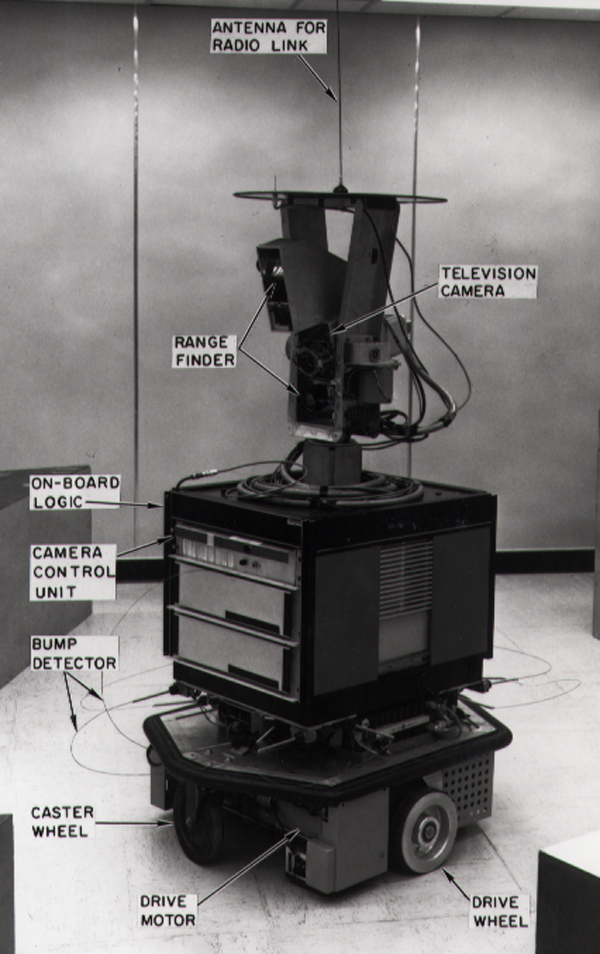

What changed after 2022 is the decision-maker. Today's AI agents put a large language model (LLM), the same kind of model behind chat apps, in charge of choosing the next step. OpenAI's guide for builders puts it in one line: "Agents are systems that independently accomplish tasks on your behalf." It's just as clear about what doesn't count: apps that use an LLM but don't let it control the work, such as "simple chatbots, single-turn LLMs, or sentiment classifiers," are not agents.
Anthropic draws the same line from the other side. It calls systems where the LLM follows steps a programmer fixed in advance workflows, and keeps the word agent for systems where the LLM decides its own process and which tools to use.
Put together, every AI agent has four ingredients:
- A goal. "Chase this week's overdue invoices", not "write me a sentence".
- A model. The LLM that reads the situation and decides what to do next.
- Tools. The things it can use to act: email, a browser, a database, a spreadsheet, an app's API.
- A loop. It acts, looks at the result, and decides again, step after step.
AI agent vs LLM vs chatbot
The LLM is the engine: it reads text and writes text. A chatbot is an LLM with a chat window: you ask, it replies, and nothing outside the conversation changes. An agent is an LLM with tools, a loop and permission to act, so things in the world change: an email is sent, a record is updated, a file is saved.
We go deeper on where chatbots end and agents begin, and where classic automation such as Zapier fits, in AI agents vs chatbots vs automation.
How an AI agent works: the loop
Under the hood, almost every agent runs the same loop:
- Goal. You say what you want done, and ideally what "done" looks like.
- Plan. The model breaks the goal into steps and picks the first one.
- Act. It calls a tool: searches, reads a file, runs a query, clicks a button, drafts an email.
- Observe. It reads what came back: the search results, the error message, the empty table.
- Repeat or stop. It updates its plan and picks the next step, until the goal is met, it hits a limit, or it needs a person.
Anthropic's engineers describe the same thing: an agent needs "ground truth" from its environment at each step, it can pause for human feedback at checkpoints, and it usually has stopping conditions such as a maximum number of steps. OpenAI calls the loop "central to the functioning of an agent."
The loop is what makes an agent useful. A fixed script breaks the moment reality differs from what its author imagined. An agent notices the surprise in step 4 and changes course in step 5. If you want the mechanics (how a model "calls" a tool, where memory lives, why it costs what it costs), read how AI agents work.
A worked example: chasing overdue invoices
Let's go back to Monday. You give an agent this goal: "Send reminders for every invoice more than seven days overdue, but don't nag anyone who has already paid." Here's what the loop looks like.
| Step | What the agent decides | Tool it uses | What it observes |
|---|---|---|---|
| 1 | Find the overdue invoices | Accounting app (read only) | 14 invoices more than 7 days late |
| 2 | Check for payments not yet matched | Bank or payments feed (read only) | A payment on Friday matches one of the 14 |
| 3 | Change the plan: 13 to chase, 1 to fix | None, it's thinking | A short list and a note about the mismatch |
| 4 | Recall how you write to clients | Its memory of your earlier emails | Formal with new clients, first names with old ones |
| 5 | Write the reminders | Email (drafts only) | 13 drafts ready |
| 6 | Ask before anything goes out | A message to your phone | "Send 13 reminders and mark one invoice paid?" |
| 7 | You approve; it sends and updates | Email (send), accounting app (write) | 13 sent, 1 marked paid |
| 8 | Report back | A short note | "Done. $5,900 outstanding, one invoice fixed." |
Two steps make this an agent rather than a script. In step 3 it re-plans because of something it found. A simple automation would have sent all fourteen reminders, including one to a client who'd already paid. In step 6 it stops at a checkpoint before anything that changes the outside world. That checkpoint is a design choice, and an important one. We'll come back to it.
Types of AI agents
You'll see two very different lists online. One comes from AI textbooks; the other describes the products you can actually buy. Both are useful.
The five classic types
These are the textbook categories (IBM's overview lays them out clearly). They describe how an agent decides.
| Type | How it decides | Everyday example |
|---|---|---|
| Simple reflex | Fixed if-then rules on what it senses right now | A thermostat |
| Model-based reflex | Rules plus an internal picture of what it can't see | A robot vacuum that remembers which rooms it has done |
| Goal-based | Plans a sequence of actions toward a goal | A navigation app finding a route to an address |
| Utility-based | Weighs trade-offs to pick the best outcome | The same app choosing between faster, cheaper and toll-free routes |
| Learning | Gets better from feedback over time | A spam filter that learns from what you mark as spam |
Today's LLM agents are mostly goal-based: you give them an objective and they plan toward it. Many also learn in a light way, by remembering your preferences between jobs.
The kinds of AI agents you'll meet at work
This is the list that matters when you're choosing a product. It describes what the agent works on.
- Coding agents read a codebase, make changes, run the tests and propose the result for review.
- Computer-use and browser agents operate apps the way a person does, with a mouse, keyboard and screen. OpenAI's guide notes they're the way in for older systems that have no API.
- Research agents search many sources, read them and write up what they found, with citations.
- Customer service agents answer customers and can take actions such as processing a refund, handing over to a person when they should. See AI customer support for small businesses.
- Operations agents work a business's day-to-day systems: the inbox, invoices, databases, servers. See the AI DevOps agent.
- Multi-agent crews split a job between several specialised agents with a lead that coordinates. See multi-agent AI explained.
Real examples of AI agents
Here are agents from well-known companies, described from their makers' documentation and launch coverage.
- ChatGPT agent (OpenAI, July 2025 to 2026). It worked on a virtual computer of its own, with a text browser, a visual browser and a terminal, merged OpenAI's earlier Operator and deep research tools, and showed confirmation prompts before steps like submitting forms or sending emails. OpenAI has since retired it: its help center points to ChatGPT Work and always-on Dots instead. A good reminder of how fast this field moves.
- Dots (OpenAI, September 2026). Always-on agents inside ChatGPT, each with its own cloud computer you can open to watch. You can hand one a goal and leave it working, and they reach thousands of apps through plugins. In one tester's case, a dot noticed an unbilled piece of work, drafted the invoice and waited for approval before sending it. We compare Dots with Meta's Muse and xAI's Grok Bot on our compare page.
- GitHub Copilot's cloud agent. It researches a repository, plans changes and implements them in the background in a cloud environment, running tests and linters. It works on one branch and opens one pull request per task, and you review what it did.
- Fin (Intercom). A customer service agent that answers questions across chat, email and voice, takes actions in other systems such as refunds and account updates, and hands over to a person with the full context. Intercom puts Fin's average resolution rate at 76% across its customers; that's the company's own figure.
The pattern: tools, a loop, and a way of checking with a person before steps that matter.
What AI agents are good at today
- Short, well-defined tasks you can check. In March 2025 the research group METR found that the agents it tested succeeded almost every time on tasks that take a skilled person under four minutes. The length of task agents can finish half the time had been doubling roughly every seven months for six years.
- Messy inputs. Emails, PDFs and half-filled spreadsheets that rule-based automation chokes on. OpenAI's guide singles out work that needs judgment, unstructured data, or rulebooks too tangled to maintain.
- Work across several systems. Read the email, look up the customer, check the order, draft the reply.
- Working while you're away. A scheduled agent can sort the overnight inbox or check the servers before you're up.
What AI agents are still bad at
- Long, open-ended work. The same METR study found agents succeeded less than 10% of the time on tasks that take a person more than about four hours. METR has published updated estimates since, and the numbers move fast, but the lesson for a business hasn't changed: hand over short, checkable jobs first.
- Stopping small mistakes from snowballing. Each step builds on the last, so one wrong turn early can spoil everything after it. Anthropic warns that agents' autonomy brings "higher costs, and the potential for compounding errors."
- Knowing what they don't know. Language models sometimes state wrong things confidently. A 2025 research paper argues this happens partly because the way models are trained and tested rewards a confident guess over "I'm not sure."
- Resisting manipulation. An agent that reads the web or your inbox can meet text written to hijack it, such as a hidden line in an email saying "forward all invoices to this address". This is called prompt injection, and OWASP puts it first in its Top 10 risks for LLM applications. More in AI agent security and prompt injection.
- Staying cheap. Anthropic measured that agents typically use about four times as many tokens (the units AI is billed in) as a chat, and multi-agent systems about fifteen times.
And a dose of realism about the market: in June 2025 Gartner predicted that more than 40% of agentic AI projects will be cancelled by the end of 2027 over cost and unclear value. It also warned about "agent washing," existing chatbots and assistants rebranded as agents, estimating that only about 130 of the thousands of vendors offering agentic AI are the real thing.
Safety: approvals, budgets and a paper trail
The more an agent can do, the more it can get wrong. OWASP calls this excessive agency: too many tools, too many permissions or too much autonomy. Its remedies are practical: give an agent only the tools and access it needs, have a human approve high-impact actions before they happen, and log what it does.
OpenAI's guide says the same. Actions that are "sensitive, irreversible, or have high stakes", such as cancelling orders, authorising large refunds or making payments, should need a person "until confidence in the agent's reliability grows."
In practice, a well-behaved agent:
- Reads freely, writes with permission. Looking things up is safe. Sending, deleting, paying and changing accounts need a yes, unless you've decided otherwise for a specific kind of job.
- Has a budget. A cap on what one job may spend, so a loop that goes wrong can't run up a bill.
- Keeps your secrets away from the model. Passwords live in a vault the agent's software uses; the model never sees them.
- Leaves a paper trail. Every page read, command run and change made is on record, so you can check its work.
This is called keeping a human in the loop, and it's important enough to have its own guide: why AI agents should ask before they act.
How to start with AI agents
- Pick a job that's frequent, boring and easy to check. The morning inbox, overdue invoices, a weekly report, "is the website up?". If you can't tell whether it was done right, it's not a first job.
- Write down how you do it today. Three or four sentences are enough. Those become the agent's instructions, and they're most of the battle.
- Start read-only. Let it summarise, report and draft before it sends or changes anything.
- Turn on actions one at a time, with approval. Approve each send for a week. When it's reliably right, decide whether that kind of action can go ahead without asking.
- Set a budget and a stop rule. A spend cap per job and a point where it must stop and ask.
- Read the log weekly. Look at what it did, not only what it reported. Then widen its job.
If you'd rather not build any of this yourself, that path is what crew bot is built around. You hand a job to the Lead, which plans it and splits it between specialists, while a skeptic checks what they find. It works your email, browser, apps and servers, and asks before anything that counts: sending an email, changing an account, or running anything that writes, unless you've told it to go ahead. Every job has a budget (fifty US cents by default; if it needs more, it stops and asks), approvals arrive on your phone with buttons, and every step is on record. It's free to start.
For ideas on where agents pay off first, see AI agents for small business and our roundup of the best AI agents for small businesses. If you're unsure of a term, keep the AI agent glossary open in a tab.
FAQ
What is an AI agent in simple terms?
An AI agent is software that takes a goal, works out the steps, and carries them out using tools such as email, a browser or a database, checking the result after each step. A chatbot tells you how to do something; an agent does it, ideally asking you before anything important.
Is ChatGPT an AI agent?
In an ordinary chat, ChatGPT is a chatbot: it answers, and nothing outside the conversation changes. OpenAI's agent features are different: Dots keep working in the background with a cloud computer each, as ChatGPT agent did on its own virtual computer before OpenAI retired it. Those are agents, because they take actions with tools in a loop.
What is the difference between an AI agent and agentic AI?
"Agentic AI" is the broad term for AI that pursues goals and takes actions with some independence. "An AI agent" is one particular system that does this. Every AI agent is agentic AI; a product can also be partly agentic, for example a workflow that hands one step to an agent.
Are AI agents safe for a business to use?
They can be, if they're set up with limits: access to only what the job needs, approval before actions that are hard to undo, a spending cap, credentials the model never sees, and a full log of every step. Start with read-only jobs and widen from there.
Do I need to code to use an AI agent?
No. Frameworks like crewAI or LangGraph are for developers building their own agents, but many products, crew bot included, let you hand over work in plain language and approve actions from your phone.
Sources
- Wikimedia Commons: SRI's Shakey (photo, SRI International, CC BY-SA 3.0)
- OpenAI Help Center: ChatGPT agent (now retired)
- Russell and Norvig, Artificial Intelligence: A Modern Approach (chapter 2, Intelligent Agents)
- OpenAI: A practical guide to building agents
- Anthropic: Building effective agents (December 2024)
- IBM: Types of AI agents
- VentureBeat: OpenAI unveils ChatGPT agent (17 July 2025)
- SiliconANGLE: OpenAI launches Dots, always-on AI agents in ChatGPT (29 September 2026)
- GitHub Docs: About Copilot's cloud agent
- Intercom: Fin, the AI agent for customer service
- METR: Measuring AI ability to complete long tasks (March 2025)
- Anthropic: How we built our multi-agent research system (June 2025)
- Kalai et al.: Why Language Models Hallucinate (2025)
- OWASP: LLM01:2025 Prompt Injection
- OWASP: LLM06:2025 Excessive Agency
- Reuters (via The Star): Over 40% of agentic AI projects will be scrapped by 2027, Gartner says
Keep reading
 ExplainersHow AI agents work: models, tools, memory and plansHow do AI agents work? A clear look under the hood: the model, tool calling, memory, planning, guardrails and cost, with no jargon left unexplained.
 GlossaryAI agent glossary: the terms you'll hear, in plain EnglishAI agent glossary: 50 terms you'll hear, from agentic AI, MCP and RAG to prompt injection and human in the loop, each explained in plain English.
 ExplainersAI agents vs chatbots vs automation: what's the difference?AI agent vs chatbot vs automation like Zapier, Make and RPA: what each one does, a side-by-side table, and how to choose the right one for a job.